Best AI Note Taking Devices in 2026: 6 Practical Picks
You remember the conversation. You remember agreeing to something. The deadline? That’s somewhere between three notebook pages and a recording you’ll probably never replay.
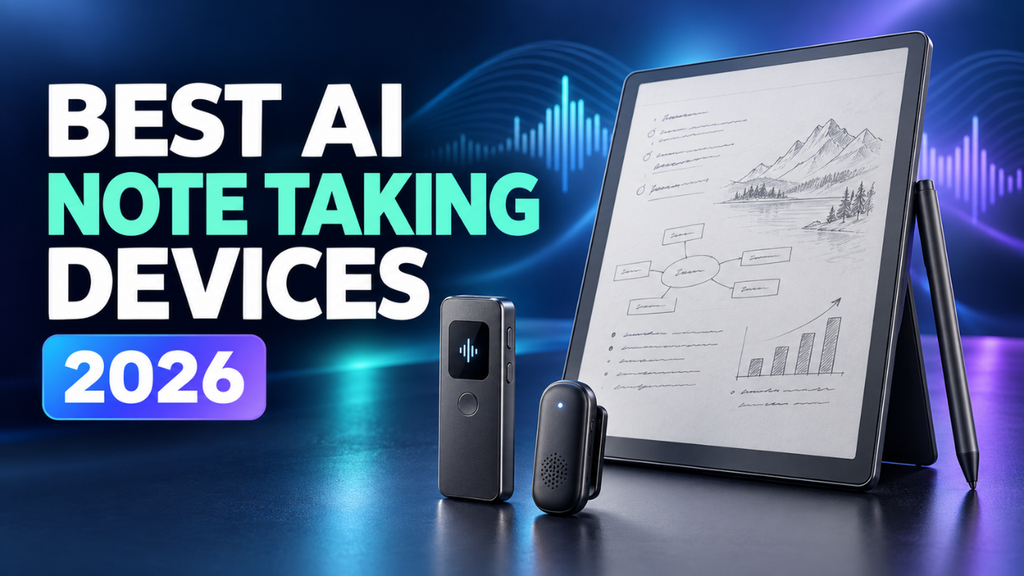
That’s the problem a good note taking device should solve. Some record conversations and turn them into searchable notes. Others give you a digital page for handwriting, then help you find or summarize what you’ve written.
The best AI note taking devices in 2026 serve different habits. My shortlist includes three conversation recorders and three digital notebooks, chosen around their published features, costs, and practical uses. The sensible purchase depends on where your notes usually fall apart.
Table of Contents
- Start with the notes you actually take
- Plaud Note Pro fits a meeting-heavy week
- Plaud NotePin S follows you away from the desk
- HiDock P1 makes frequent transcription more affordable
- BOOX Note Air6 C handles a broader workflow
- Kindle Scribe suits readers who think with a pen
- Viwoods AiPaper puts handwritten ideas first
- Choose for an ordinary Tuesday
Start with the notes you actually take
Before comparing microphones or screen sizes, think about your last frustrating note taking moment.
Maybe a client explained a complicated request while you struggled to type. A recorder could help. Perhaps you understood a lecture perfectly, then couldn’t find your own explanation two weeks later. A searchable digital notebook might be more useful.
Recording a conversation and understanding your handwritten thinking are different jobs. Buying an expensive writing tablet won’t automatically fix missed phone calls. Wearing a recorder won’t replace the diagram you need to draw.
Prices below are advertised US hardware prices checked in October 2026, before taxes and optional services. Battery figures are manufacturer ratings. For recurring costs, count your likely recording hours before deciding that an included plan is enough.
Plaud Note Pro fits a meeting-heavy week
For someone juggling client calls, interviews, and meetings, I’d start with the Plaud Note Pro. Its card-shaped design suits a table or a phone attachment, and it supports both in-person recording and phone-call capture.
At $189, it has four microphones and an advertised pickup range of up to 16.4 feet. Plaud rates recording time at up to 30 hours in Enhance mode or 50 hours in Endurance mode. The distinction matters: that bigger battery claim comes from a particular setting.
Picture a project briefing where the client changes the delivery date halfway through. A transcript and structured summary can make that change easier to locate afterward. You’ll still want to check the original wording before sending your follow-up.
The ongoing cost deserves attention. Plaud includes 300 transcription minutes per month. Five one-hour meetings consume that allowance. Its Pro plan offers 1,200 monthly minutes at an advertised $8.33 per month, billed annually. Regular users should factor that ongoing expense into the hardware price.
Plaud NotePin S follows you away from the desk
A table recorder becomes less convenient when your work involves walking around. Think property visits, exhibition interviews, or conversations during a site inspection.
The Plaud NotePin S makes more sense there. It costs $179, weighs 17.4 grams, and includes a clip, magnetic pin, lanyard, and wristband. Plaud advertises up to 20 hours of continuous recording. A physical button starts recording, while a short press marks an important moment.
That highlight control is the feature I’d pay attention to. Marking the moment someone explains a requirement gives you a useful place to return to later.
There’s a clear limitation, though: the NotePin S doesn’t support direct phone-call recording. Its main job is capturing nearby conversations. It also has the same 300-minute monthly starter allowance as the Note Pro, so a smaller device doesn’t mean lower transcription costs.
HiDock P1 makes frequent transcription more affordable
Let’s be honest: monthly minute limits can become annoying when recording is part of your daily work.
The HiDock P1, listed at $169, offers unlimited basic transcription for device owners through HiNotes. Its BlueCatch connection supports recording two-way audio through compatible Bluetooth earphones, making it worth considering if you spend much of your week on calls. It also has room and voice-memo recording modes.
For example, a freelance researcher conducting several interviews each week could benefit more from that ongoing transcription allowance than from a thinner recorder.
However, unlimited basic transcription doesn’t include every advanced feature. HiDock places speaker identification, live transcription, and other tools in its paid offering. Compare those details with the notes you actually need.
I’d also check the connection instructions for your specific computer, phone, and earphones before ordering. The appeal here depends on how well the recording setup fits the equipment you already use.
BOOX Note Air6 C handles a broader workflow
If your notes involve PDFs, handwriting, apps, and recorded discussions, the BOOX Note Air6 C deserves a look.
BOOX lists it at $579.99 with a 10.3-inch color E Ink screen, Android 16, and an included Pen3 stylus. Google Play access allows compatible apps, while its Talk Insights feature brings meeting and audio analysis into the device. BOOX also lists real-time voice transcription, document summaries, and OCR tools.
Imagine reviewing a research paper, jotting questions beside a chart, then discussing those questions in a study group. That combination of reading, writing, and audio is where this tablet’s broader feature set becomes interesting.
Talk Insights requires an internet connection, current firmware, and activation under Lab Features. It’s also limited to supported regions and languages. The screen’s color resolution is 150 ppi, compared with 300 ppi for black-and-white content.
I’d choose the Air6 C if you enjoy adapting tools to your workflow. If you want to open a notebook and immediately start writing, its app flexibility may be more than you need.
Kindle Scribe suits readers who think with a pen
The Kindle Scribe, third generation, is an appealing choice when reading and note taking naturally happen together.
The current lineup has an 11-inch display. US prices start at $429.99 without a front light, while the front-lit model starts at $499.99. The Colorsoft version starts at $629.99 if color matters to your annotations.
Its notebook search lets you ask questions in everyday language and receive answers drawn from your handwritten notes. Summarization can process up to 15 notebook pages at once. Those are useful features when you remember discussing a topic but can’t remember which notebook contains it.
Say you’ve written reading notes across several weeks. Asking about the arguments you collected could be quicker than opening every page individually.
Check regional feature support before buying, since notebook tools aren’t available everywhere. I’d favor the monochrome version for mostly text-based work and spend extra on color only if it serves a regular purpose. Frequent readers have the clearest reason to choose this one.
Viwoods AiPaper puts handwritten ideas first
Some people need room to think before they need a polished summary. The Viwoods AiPaper is worth considering for that kind of work.
Its $549 package includes a 10.65-inch digital paper tablet, stylus, and protective case. Handwriting conversion, note layers, templates, and tags help organize written material. Its built-in assistant supports tasks such as summarizing, explaining, and translating content.
A useful scenario is planning a proposal: sketch the idea, write rough questions, then ask for help condensing the written material. You can keep the messy thinking alongside the cleaner version.
The important boundary is connectivity. Viwoods says its assisted features require internet access, while basic handwriting and locally stored documents remain usable offline.
That makes AiPaper a better fit for someone who mainly wants a writing space with occasional help organizing ideas. For hours of daily interviews, I’d still look first at one of the dedicated recorders.
Choose for an ordinary Tuesday
The best purchase should make a familiar task easier every week.
For mixed meetings and phone calls, the Plaud Note Pro would be my starting point. The NotePin S fits mobile conversations, while HiDock P1 is especially interesting when transcription volume drives the cost. Among the notebooks, BOOX offers broader flexibility, Kindle Scribe fits a reading habit, and Viwoods centers on handwritten work.
Before committing, follow one sample note through the whole process. Can you capture it easily, find the important detail, and move the result into the place where you work? A beautiful summary loses its value if sharing it takes ten awkward steps.
For recorded conversations, get participants’ permission and check how the service handles uploaded audio. Review names, dates, and commitments against the recording before relying on a summary.
You may already have a phone or tablet that handles occasional notes well enough. Buy dedicated hardware when you can point to a recurring problem it solves. The right device earns its place by making your next meeting, reading session, or handwritten plan easier to use afterward.




1 thought on “Best AI Note Taking Devices in 2026: 6 Practical Picks”